Location comparison
The comparison page shows the energy mix of all your locations side by side. This gives you a quick overview of which locations import a lot from the grid, use a lot of self-generated energy, or export a lot.
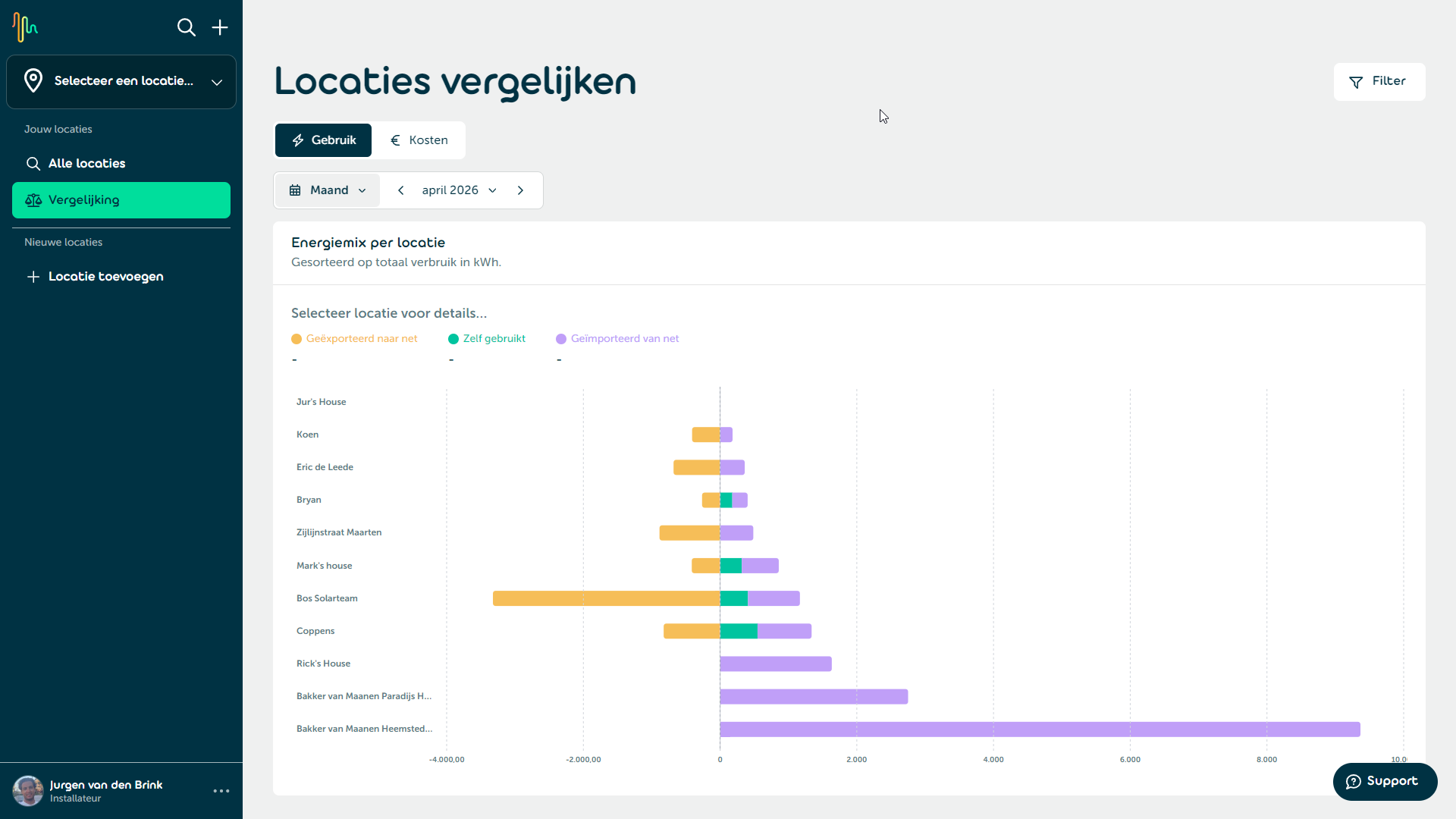
📊 Energy mix per location
The chart shows the energy distribution for each location in three categories:
- Exported to grid: Energy that has been fed back to the grid.
- Self-consumed: Energy that was self-generated and consumed directly.
- Imported from grid: Energy that was drawn from the grid.
Locations are sorted by total consumption in kWh. Click on a location in the chart to view its detailed figures at the top.
⏱️ Time period
In the top left you set the time period for the comparison. Choose from Day, Week, Month, Year, or a Custom date range. Use the arrows to navigate between periods and the refresh button to reload the data.
🔍 Filter
Click the Filter button in the top right to open the filter panel with the following options:
- Filter by location: Select one or more locations to limit the comparison to those locations.
- Compare by floor area: Choose Total floor area to show absolute values in kWh, or Per m² to normalize consumption by the floor area of each location. This makes locations of different sizes more comparable.
When the floor area filter is enabled, only locations with a known floor area are shown.