Battery automation
This automation controls how Currentt charges and discharges the battery.
📋 Overview
With the battery automation, Currentt optimizes the charging and discharging of the battery based on tariffs, solar surplus, zero import, and peak shaving. You configure each function individually to control how the battery is managed.
For some features to work correctly, the energy tariffs of the relevant location must be available. Make sure the correct energy tariffs have been entered in the Currentt App.
Scenarios
- My battery should only be charged using solar surplus, not based on my grid tariffs.
- My battery should ensure I import as little energy from the grid as possible, dynamically charging and discharging to achieve this.
- My battery should be optimally charged and discharged based on dynamic electricity prices.
- I have a grid congestion issue and want my battery to respond to peak loads to ensure I stay within my grid connection capacity.
Example
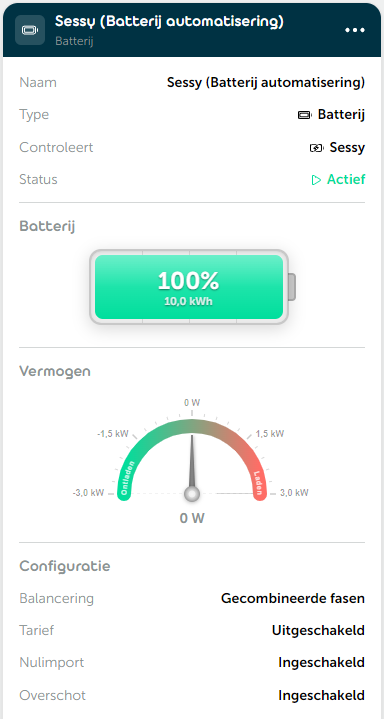
🎛️ Possibilities
Battery
You choose which battery is controlled by the automation.
Optionally, you configure an alternative battery meter: an external meter to read the battery capacity instead of the internal battery meter.
Balancing
You choose how Currentt distributes power across the phases:
- Combined phases: Balance the power across all phases together.
- Individual phases: Balance the power on each phase separately.
Tariff
With tariff optimization, Currentt optimizes the charging and discharging of the battery based on energy prices. You configure this with the following settings:
Operating mode — determines whether the battery charges, discharges, or both:
- Charge and discharge: Charge at low prices and discharge at high prices.
- Charge only: Charge only at low prices.
- Discharge only: Discharge only at high prices. Low wear: max 0.5 cycles/day.
Trading strategy — determines how intensively the battery is used:
- Conservative: Low wear, max 0.5 cycles/day. Best option for battery longevity.
- Balanced: Moderate, max 1 cycle/day. Good trade-off between profit and battery life.
- Aggressive: High utilization, max 2 cycles/day. Maximum profit.
- Custom: Full control over all cycle management parameters. Configure:
- Maximum cycles per day (0 = unlimited)
- Battery cost — purchase price of the battery system
- Expected lifetime cycles — total number of equivalent cycles for which the battery is rated
- Round-trip efficiency — AC return efficiency of the battery
- Minimum profit margin — additional profit required on top of the depreciation cost per kWh; Currentt calculates the depreciation cost and minimum discharge price from this
Additionally, you optionally configure:
- Maximum charge price: Only charge from the grid when the energy price is below this value. Default: €0/kWh.
- Minimum discharge price: Only feed back to the grid when the energy price is above this value. Default: €0/kWh.
Zero import
Zero import prevents importing power from the electricity grid as much as possible by deploying the battery. Additionally configure:
- Minimum discharge price: Only discharge the battery for zero import when the tariff price exceeds this value. Default: €0/kWh.
- Exclude meters: Ignore the readings of selected meters in the zero import algorithm. Useful for excluding devices that measure their own energy (such as an EV charger) from the calculation.
Surplus
The battery automatically charges when solar surplus is available. Additionally configure:
- Maximum charge price: Only charge the battery on surplus when the tariff is below this value. Default: €0/kWh.
- Exclude meters: Exclude the readings of selected meters from the surplus calculation.
Peak shaving
Peak shaving limits the power imported from or exported to the grid:
- Maximum import power: The maximum power that can be imported from the electricity grid. Default: 0 W.
- Maximum export power: The maximum power that can be exported to the grid. Default: 0 W.
Optionally enable Optimize battery condition: Currentt periodically charges and discharges the battery to prevent it from slowly draining when only peak shaving is active. Configure:
- Interval: Daily, weekly, or monthly. Default: weekly.
- Discharge to: The SoC level to which the battery is first discharged. Default: 20%.
- Charge to: The SoC level to which the battery is then recharged. Default: 90%.
Schedule
With scheduling you set time windows within which the battery may charge or discharge, or you create a custom schedule:
- Charging time window: The time window within which charging is allowed.
- Discharging time window: The time window within which discharging is allowed.
- Custom charge/discharge schedule: Add specific schedule blocks at a set power. Per block you configure:
- Charge or discharge and the power (slider)
- Start time
- End criterion: until a fixed end time, or until a target SoC level (target state of charge)
📝 Managing automations
Adding an automation
- Go to Automations within your installation.
- Click
➕to add a new automation. - Select Battery as the type and click
Next. - Choose the desired battery. Optionally enable the Alternative battery meter and select the corresponding meter. Click
Next. - Give the automation a recognizable name and click
Next. - Choose the desired balancing mode and click
Next. - Optionally configure tariff optimization with operating mode, trading strategy, and price limits. Click
Next. - Optionally configure zero import and set up the meters to exclude. Click
Next. - Optionally configure surplus charging. Click
Next. - Optionally configure peak shaving. Click
Next. - Optionally configure time windows or a custom charge/discharge schedule.
- Click
➕ Createto save the automation.
Editing an automation
Open the relevant automation and adjust the desired settings. Each step has a Save & close button that saves your changes immediately without having to go through all steps again.