Heat pump automation
This automation controls how Currentt protects the heat pump against power peaks and uses it during solar surplus.
📋 Overview
With the heat pump automation, Currentt protects the heat pump against power peaks via load balancing, and makes use of excess solar energy by automatically switching the heat pump to a higher operating mode.
Scenarios
- I have a heat pump that can be switched via SG-Ready and want it to pre-heat when solar surplus is available.
- I want to increase my self-consumption by controlling my heat pump with solar surplus.
Example
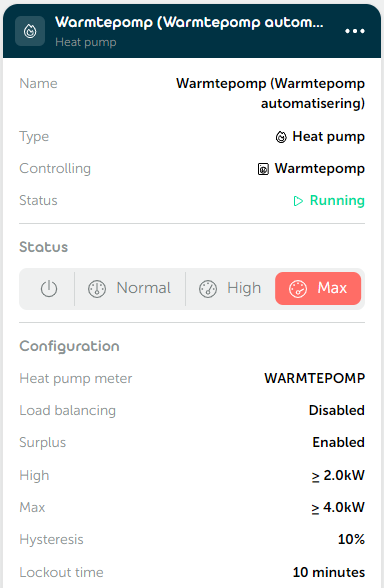
🎛️ Possibilities
Heat pump
You choose which heat pump is controlled by the automation.
Optionally, you configure a heat pump meter: when the power of the heat pump is measured, the surplus options for the heat pump can be enabled.
Load balancing
Load balancing prevents fuse tripping by monitoring per-phase power and blocking the heat pump when limits are exceeded.
- Enable load balancing: Switches the heat pump off when the power on any of the phases used by the heat pump exceeds the power limit.
- Minimum off time: Keeps the heat pump off for a minimum time after an overload before allowing recovery. Default: 10 minutes.
- Custom peak power limit: When disabled, the power limit is derived from the mains meter (PAP) range. When enabled, configure:
- Maximum peak power (W): Total power limit across all phases. Default: 10,000 W.
Surplus
Surplus consumption optimizes usage of excess PV production by automatically switching the heat pump to higher operating modes:
- High threshold (W): Surplus power above this value switches the heat pump to High mode. Default: 2,000 W.
- Max threshold (W): Surplus power above this value switches the heat pump to Max mode. Default: 4,000 W.
- Surplus calculation mode — determines how available surplus is calculated:
- Total: Calculate surplus by summing all phases.
- Per phase: Calculate surplus only on the phases the heat pump is connected to.
- Hysteresis: Lowers the exit threshold by a percentage so the heat pump doesn't rapidly switch on and off when surplus power fluctuates around a threshold. For example: 10% hysteresis on a 2,000 W threshold keeps High mode active until surplus drops below 1,800 W. Default: 10%.
- Lockout time: Minimum time between state changes. Protects the heat pump against rapid switching. Default: 10 minutes.
📝 Managing automations
Adding an automation
- Go to Automations within your installation.
- Click
➕to add a new automation. - Select Heat pump as the type and click
Next. - Choose the desired heat pump. Optionally enable the Heat pump meter and select the corresponding meter. Click
Next. - Give the automation a recognizable name and click
Next. - Optionally configure load balancing and click
Next. - Optionally configure surplus consumption with thresholds, calculation mode, and protection settings.
- Click
➕ Createto save the automation.
Editing an automation
Open the relevant automation and adjust the desired settings. Each step has a Save & close button that saves your changes immediately without having to go through all steps again.