PAP/SAP automation
This automation controls how Currentt determines the correct grid connection point for energy consumption and feed-in.
📋 Overview
With the PAP/SAP automation, Currentt determines which allocation point is used for the consumption and feed-in of energy. This is relevant for installations with two separate grid connections: a primary allocation point (PAP) and a secondary allocation point (SAP) with different energy contracts per allocation point.
For the PAP/SAP automation to work correctly, the energy tariffs of the relevant location must be available. Make sure the correct energy tariffs have been entered in the Currentt App.
Scenarios
- I have a dynamic and a fixed contract within the same connection. They need to be switched optimally based on the different tariffs, both for consumption and feed-in.
Example
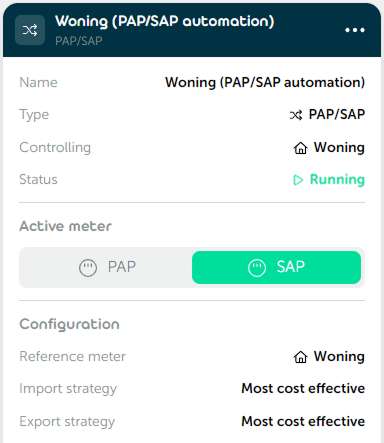
🎛️ Possibilities
PAP/SAP switch
You choose which PAP/SAP switch is controlled by the automation.
Options
You configure how Currentt determines which allocation point is used at any given moment:
- Pin to meter when consuming: Select the meter (PAP or SAP) that is always used when energy is being consumed (imported) from the grid.
- Pin to meter when generating: Select the meter (PAP or SAP) that is always used when energy is being fed back (exported) to the grid.
- Alternative energy meter: Select an alternative meter to determine whether energy is being consumed or fed back, instead of using the combined PAP and SAP meters. Useful when a device such as an EV charger provides a more accurate reading of the energy direction.
📝 Managing automations
Adding an automation
- Go to Automations within your installation.
- Click
➕to add a new automation. - Select PAP/SAP as the type and click
Next. - Choose the desired PAP/SAP switch and click
Next. - Give the automation a recognizable name and click
Next. - Configure the desired options: pin to meter when consuming and/or generating, and optionally enable the alternative energy meter.
- Click
➕ Createto save the automation.
Editing an automation
Open the relevant automation and adjust the desired settings. Each step has a Save & close button that saves your changes immediately without having to go through all steps again.