Solar panels automation
This automation controls how Currentt handles the output of your solar panels.
📋 Overview
With the solar panels automation, Currentt automatically adjusts the feed-in from your inverter based on a balancing mode and an optional tariff condition. This allows you to prevent excess energy from being fed back to the grid, for example.
For some features to work correctly, the energy tariffs of the relevant location must be available. Make sure the correct energy tariffs have been entered in the Currentt App.
Scenarios
- End of net metering: when there is solar surplus, I want to prevent it from being fed back to the grid.
- When tariffs are negative (price threshold is set to €0.00/kWh), I want to prevent feed-in to the grid.
- I received a letter from the grid operator and am no longer allowed to feed back to the grid.
Example
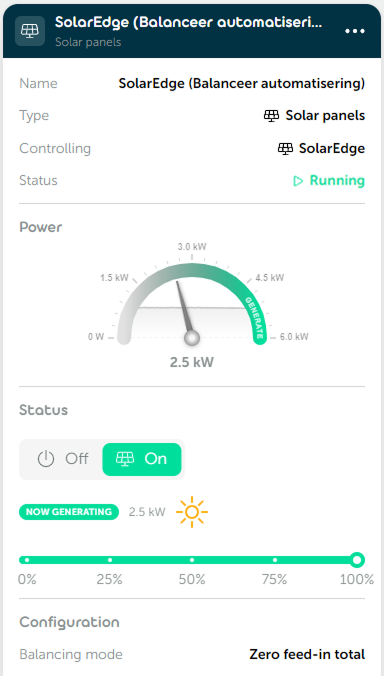
🎛️ Possibilities
Inverter
You select for which inverter this automation will be applied.
Balancing mode
You choose how Currentt limits the feed-in from the solar panels:
- Zero feed-in total – The balancing mode is applied to the total system. Currentt tries to prevent any net energy from being fed back to the grid.
- Zero feed-in per phase – The balancing mode is applied per phase and tries to prevent feed-in on each individual phase.
- Per phase – The balancing mode is applied per phase and tries to ensure that energy is drawn from the grid on every phase.
Tariff condition
With the optional tariff condition, the automation only runs when the energy price is below a set threshold. Set the price threshold to €0 / kWh to only activate the automation when energy prices are negative — that is, when you have to pay to deliver energy to the grid.
📝 Managing automations
Adding an automation
- Go to Automations within your installation.
- Click
➕to add a new automation. - Select Solar panels as the type and click
Next. - Under Inverter, choose the inverter you want to control and click
Next. - Give the automation a recognizable name and click
Next. - Choose the desired balancing mode and click
Next. - Optionally enable the Tariff option and set the price threshold.
- Click
➕ Createto save the automation.
Editing an automation
Open the relevant automation and adjust the desired settings. Each step has a Save & close button that saves your changes immediately without having to go through all steps again.