Contactors
Connect contactors for switching devices such as heat pumps and boilers that are SG-ready.
ℹ️ About contactors
The Currentt Navigator Pro has 8 outputs for controlling contactors. The outputs provide 230VAC, making it possible to connect 230VAC contactors directly to an output. The outputs can therefore be used to switch consumers/generators on or off. For example, to control a boiler.
How it works
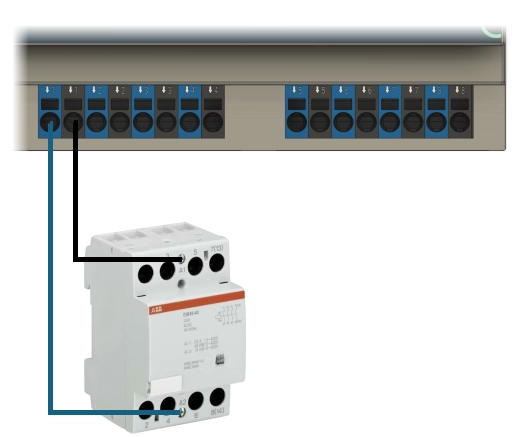
A contactor is operated by a coil. When you apply 230VAC from an output to the coil, it pulls the contacts over. Remove the voltage and they fall back to their rest position. The coil and the contacts are galvanically isolated: the Navigator switches the coil, the contacts switch a separate circuit.
There are two types of contacts:
- Make contact (Normally Open NO): open at rest, closed when the coil is energized. The connected device is OFF by default.
- Break contact (Normally Closed NC): closed at rest, open when the coil is energized. The connected device is ON by default.
🪛 Installation instructions
Each output on the Navigator can switch up to a maximum of 60W. So use contactors whose coil requires less than 60W.
Use mounting wire with a cross-section of 0.75 mm² (stranded or solid core).
Which wiring diagram you need depends on the type of device you are going to switch:
- Non-smart devices: hard on/off switching with a single contactor.
- SG-ready devices: four possible operating modes with two contactors.
Non-smart devices
For non-smart devices without their own control input (boiler, charging group, heating element), you switch the device's power supply with a single contactor. Depending on whether the device should be on or off by default, you use the different contact types, for example:
- Off by default (NO): EMAT contactor 230/400V 63A 4 make and 0 break (85010010)
- On by default (NC): EMAT contactor 230/400V 63A 0 make and 4 break (85010011)
Connection
- Connect an output of the Navigator (230VAC, phase) to A1 on the coil and the neutral to A2.
- Feed the device's power supply into the input side of the contacts (1 make contact for single-phase, 3 for three-phase).
- Connect the output side of the contacts to the device.
SG-ready devices
For SG-ready devices (such as a heat pump that supports the SG-ready protocol), four operating modes are possible:
- Mode 1 - Blocked: The heat pump is blocked.
- Mode 2 - Normal: The heat pump runs according to its own energy-efficient control logic.
- Mode 3 - High: The heat pump is encouraged to consume more electricity.
- Mode 4 - Maximum: The heat pump is forced to run at full power.
You switch these operating modes with two contactors, for example:
- Hager contactor 230V 25A 1 make and 0 break (ERC125)
- EMAT contactor 250V 25A 1 make and 1 break (85010012)
Connection
- Connect output 1 of the Navigator to A1 of contactor 1, and the neutral to A2. Do the same with output 2 and contactor 2.
- Connect the make contact of contactor 1 to the SG1 input of the heat pump and that of contactor 2 to the SG2 input.
- With both outputs off, the heat pump is in mode 2 (normal operation), the safe default position.
View detailed installation instructions for SG-ready heat pumps