CT clamps
Install CT clamps to measure circuits with other major consumers you want insight into.
ℹ️ About CT clamps
The Currentt Navigator Pro has 8 inputs for CT clamps. These clamps can be used for non-invasive measurement of power and energy. The inputs are located on the upper left side of the device.
How it works
A CT clamp (Current Transformer) measures the current in a wire without interrupting it. You simply clamp it around the current-carrying conductor.
🪛 Installation instructions
Insert the 2 wires of the CT clamp into one of the inputs indicated above. Then open the CT clamp and place the conductor to be measured inside the clamp. If there is an arrow on the CT clamp, install the clamp so that the arrow points in the direction of the current flow. Then close the clamp.
See the CT clamps documentation for detailed information on supported models, configuration, and troubleshooting.
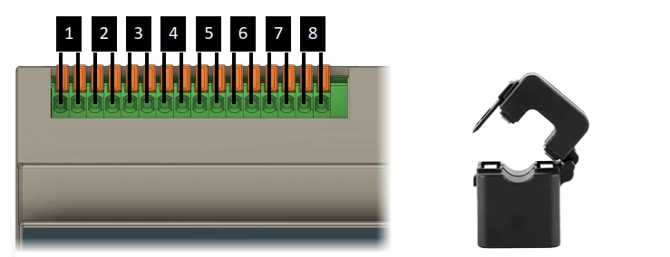
The wires of the CT clamp must be connected to the Navigator before placing the clamp around the conductor to be measured.
Never place a CT clamp around a conductor when the wires of the CT clamp are not connected.
🛒 Ordering CT clamps
If desired, Currentt can supply CT clamps for €12.95 each. These come with a longer cable than standard CT clamps.