
P1 meter

Connect the P1 port of the smart meter (PAP) using the supplied P1 cable. Use the 2nd port as an optional output or for a 2nd smart meter (SAP).


What are PAP and SAP?

A PAP (Primair Allocatiepunt / Primary Allocation Point) is the main meter of the connection. Every connection always has a PAP.

A SAP (Secundair Allocatiepunt / Secondary Allocation Point) is a second meter on the same connection. This is possible via MLOEA (Meerdere Leveranciers Op Eén Aansluiting / Multiple Suppliers On One Connection). With MLOEA, there is one active connection (one standing charge) with two separate metering points. Each metering point can have its own energy supplier and contract. The main meter is always the PAP. In the Currentt Navigator, the main connection is displayed as PAP.


Single Meter Connection Diagram (PAP)

For an installation with a single energy meter (PAP), the following installation diagram should be implemented.
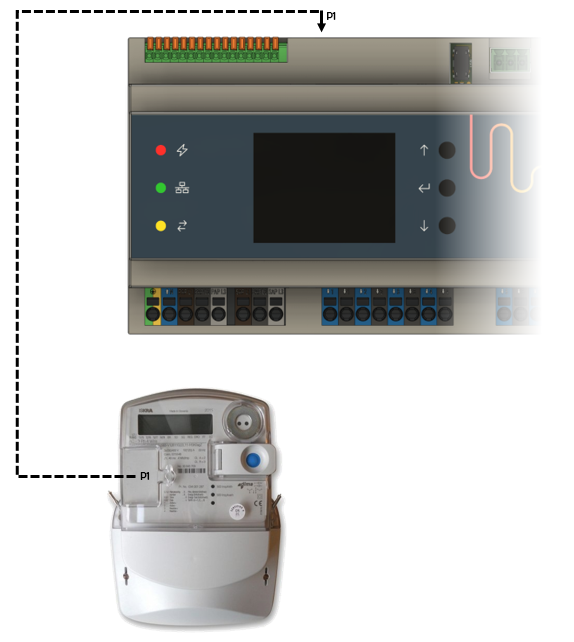
Single meter connection diagram (PAP)


P1 output for external accessory

When no SAP is connected, the 2nd P1 port (right) functions as an output. An external P1 accessory (dongle) can be connected to it, for example a third-party energy manager or display. The external accessory is powered by the Currentt Navigator — no separate power supply is needed.


Dual Meter Connection Diagram (PAP+SAP)

If an installation has 2 meters and therefore 2 allocation points on the same connection (also known as an MLOEA), the following installation diagram should be implemented. The Currentt Navigator Pro can serve as an intelligent ATS (Automatic Transfer Switch) where consumers/generators can be switched between the primary (PAP) and secondary (SAP) meter. In that case, 2 separate circuit breakers (6A is sufficient) should be installed directly after the meters for the connection to the Navigator.

Dual meter connection diagram (PAP+SAP)


ATS Connection Diagram

When the Currentt Navigator Pro is connected to both a PAP and SAP, it can serve as an ATS (Automatic Transfer Switch) that allows consumers/generators to be switched between the primary (PAP) and secondary (SAP) meter while minimizing the voltage dip as much as possible (or in some cases eliminating it entirely). The Navigator achieves this by precisely measuring voltage and current to determine the most ideal moment to switch. This switching is performed using contactors. The response times of the contactors are taken into account when determining the ideal switching moment. The maximum noticeable voltage dip is 10ms and falls within the applicable immunity standards for equipment.

ATS connection diagram