RS-485 Modbus
Connect Modbus devices such as inverters, batteries, and meters via the RS-485 bus. Make sure each device has a unique Modbus address.
ℹ️ About RS-485 Modbus
The RS-485 connection can be used to connect various types of equipment. The Currentt Navigator Pro includes a special system that allows devices with different RS-485 settings (such as baud rate, parity, and stop bits) to be connected in parallel on the same bus. This saves configuration time, since it is no longer necessary to align the RS-485 settings of the connected equipment.
How it works
RS-485 is the wiring: two wires (A and B) where the signal is the voltage difference between them. This makes it noise-resistant and suitable for long distances (up to ~1200 m), with multiple devices on a single bus.
Modbus RTU is the protocol on top of it and works according to the master/slave principle: one master (the Currentt Navigator) sends a request to a slave (connected device) with a unique address, and only that slave responds. This way, no more than one device ever transmits at the same time.
🪛 Installation instructions
Always use twisted-pair cable, using one pair for the A+ and B- connection. If the cable has shielding, connect the shielding to G on the Navigator and also to the ground of the equipment being connected. Use the supplied plug-in connector to connect the cable and then attach it to the Navigator.
Officially, RS-485 Modbus is designed for point-to-point topology. For distances less than 25 meters, star topology can generally also be used in practice.
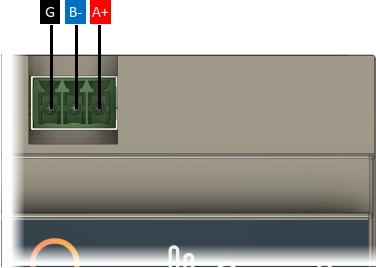
The RS-485 connection of the Currentt Navigator Pro includes an internal termination resistor of 120Ω that can be enabled or disabled via software as needed. By default, the termination resistor is enabled.