SolarEdge battery
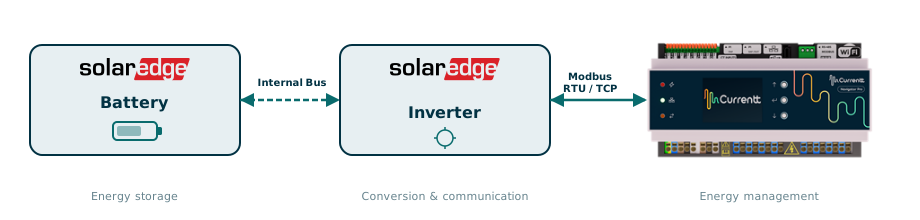
SolarEdge batteries (such as the SolarEdge Home Battery 400V) are not connected directly to the Currentt Navigator. The battery is connected to the SolarEdge inverter and is controlled and read out via the inverter.
⚙️ How it works
The SolarEdge battery communicates internally with the inverter via a proprietary protocol. All battery data (such as state of charge, power, and temperature) is available through the Modbus/SunSpec registers of the inverter. By connecting the inverter to the Currentt Navigator, you automatically gain access to the battery data and the Currentt Navigator can control the battery.
🔌 Connection options
Connect the inverter to the Currentt Navigator using one of the methods below.
Option 1: Modbus RTU (RS485)
A separate wired connection via an RS485 cable between the inverter and the Currentt Navigator. This is a direct physical connection and does not require any network infrastructure. The cable is connected to the RS485-2 port on the inverter and the RS-485 Modbus connector on the Currentt Navigator.
Option 2: Modbus TCP (local network)
A connection via the local Ethernet network. The inverter and the Currentt Navigator must both be connected to the same network (or be routable). No separate cable between the devices is needed, only a working network connection (preferably wired, but WiFi is also possible).
✅ Compatible models
| Model | Capacity | Compatible inverters |
|---|---|---|
| SolarEdge Home Battery 400V (4.6 kWh) | 4.6 kWh | Home Hub, StorEdge |
| SolarEdge Home Battery 400V (9.2 kWh) | 9.2 kWh | Home Hub, StorEdge |
| SolarEdge Home Battery 400V (23 kWh) | 23 kWh | Home Hub, StorEdge |
| LG Chem RESU (via StorEdge interface) | 3.3 - 13 kWh | StorEdge |
| BYD Battery-Box (via StorEdge interface) | 2.56 - 12.8 kWh | StorEdge |
The battery must always be connected via a compatible SolarEdge inverter. Direct connection of the battery to the Currentt Navigator is not possible.