Huawei inverter
The Huawei SUN2000 inverter is connected to the Currentt Navigator to read production data and control the system. For hybrid inverters with a connected battery, the battery is automatically included as well.
⚙️ How it works
The Currentt Navigator communicates with the Huawei inverter via the Modbus protocol. The Currentt Navigator reads production data, power levels, and status information, and can control the inverter's power output.
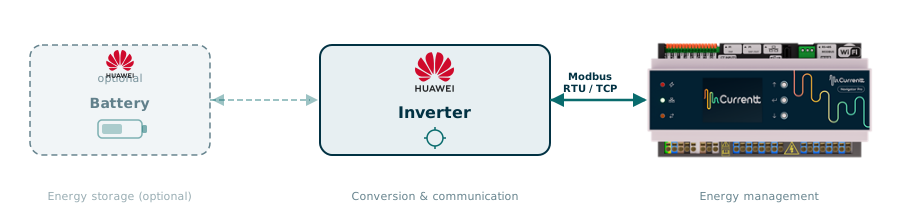
For a Huawei inverter with a connected battery (such as the LUNA2000), all battery data (SoC, charge/discharge power, status) is automatically read via the same connection. Also see the Huawei Battery guide.
🔌 Connection options
Connect the inverter to the Currentt Navigator using one of the methods below. The available method depends on whether a Huawei WLAN-FE Smart Dongle is installed on the inverter.
Option 1: Modbus RTU (RS485)
A separate wired connection via an RS485 cable between the inverter and the Currentt Navigator. This is a direct physical connection and does not require any network infrastructure. The cable is connected to the COM connector on the inverter and the RS-485 Modbus connector on the Currentt Navigator.
| Property | Value |
|---|---|
| Speed | Real-time (polling every 1-5 seconds) |
| Connection | RS485 cable (CAT5/CAT6 UTP, twisted pair) |
| Internet required | No |
| Suitable for control | Yes |
Modbus RTU via RS485 is only possible when there is no Huawei WLAN-FE Smart Dongle installed on the inverter. If a dongle is present, use Modbus TCP instead.
Option 2: Modbus TCP (local network)
A connection via the local network. The inverter (via the Smart Dongle) and the Currentt Navigator must both be connected to the same network. No separate cable between the devices is needed, only a working network connection.
| Property | Value |
|---|---|
| Speed | Real-time (polling every 1-5 seconds) |
| Connection | Ethernet (LAN) via Smart Dongle |
| Internet required | No |
| Suitable for control | Yes |
Modbus TCP is only possible when a Huawei WLAN-FE Smart Dongle is installed on the inverter.
⚖️ Comparison
| Modbus RTU | Modbus TCP | |
|---|---|---|
| Data latency | < 1 sec | < 1 sec |
| Polling interval | 1-5 sec | 1-5 sec |
| Internet required | No | No |
| Physical cable | Yes (RS485) | Yes (Ethernet, via dongle) |
| Smart Dongle | Not present | Required |
| FusionSolar cloud | Not possible | Possible (via dongle) |
| Max distance | ~1000m (RS485) | Unlimited (LAN) |
| Suitable for control | Yes | Yes |
| Setup complexity | Medium | Medium |
✅ Compatible models
Single-phase inverters (SUN2000-L1 series)
| Model | Power | Configuration via |
|---|---|---|
| SUN2000-2KTL-L1 | 2 kW | FusionSolar app |
| SUN2000-3KTL-L1 | 3 kW | FusionSolar app |
| SUN2000-3.68KTL-L1 | 3.68 kW | FusionSolar app |
| SUN2000-4KTL-L1 | 4 kW | FusionSolar app |
| SUN2000-4.6KTL-L1 | 4.6 kW | FusionSolar app |
| SUN2000-5KTL-L1 | 5 kW | FusionSolar app |
| SUN2000-6KTL-L1 | 6 kW | FusionSolar app |
Three-phase inverters (SUN2000-M1 series)
| Model | Power | Configuration via |
|---|---|---|
| SUN2000-3KTL-M1 | 3 kW | FusionSolar app |
| SUN2000-4KTL-M1 | 4 kW | FusionSolar app |
| SUN2000-5KTL-M1 | 5 kW | FusionSolar app |
| SUN2000-6KTL-M1 | 6 kW | FusionSolar app |
| SUN2000-8KTL-M1 | 8 kW | FusionSolar app |
| SUN2000-10KTL-M1 | 10 kW | FusionSolar app |
Three-phase inverters (SUN2000-M2 series)
| Model | Power | Configuration via |
|---|---|---|
| SUN2000-12KTL-M2 | 12 kW | FusionSolar app |
| SUN2000-15KTL-M2 | 15 kW | FusionSolar app |
| SUN2000-17KTL-M2 | 17 kW | FusionSolar app |
| SUN2000-20KTL-M2 | 20 kW | FusionSolar app |
Three-phase inverters (SUN2000-M5 series)
| Model | Power | Configuration via |
|---|---|---|
| SUN2000-12KTL-M5 | 12 kW | FusionSolar app |
| SUN2000-15KTL-M5 | 15 kW | FusionSolar app |
| SUN2000-17KTL-M5 | 17 kW | FusionSolar app |
| SUN2000-20KTL-M5 | 20 kW | FusionSolar app |
| SUN2000-25KTL-M5 | 25 kW | FusionSolar app |
For Modbus TCP, the following minimum firmware versions are required: SUN2000-L: V200R001C00SPC115, SUN2000-M: V100R001C00SPC139, SDongle: V100R001C00SPC127.