SolarEdge inverter
The SolarEdge inverter is connected to the Currentt Navigator to read production data and control the system. For hybrid inverters (StorEdge, Home Hub), the battery is automatically included as well.
⚙️ How it works
The Currentt Navigator communicates with the SolarEdge inverter via the SunSpec protocol (a standard built on top of Modbus). The Currentt Navigator reads production data, power levels, and status information, and can control the inverter's power output.
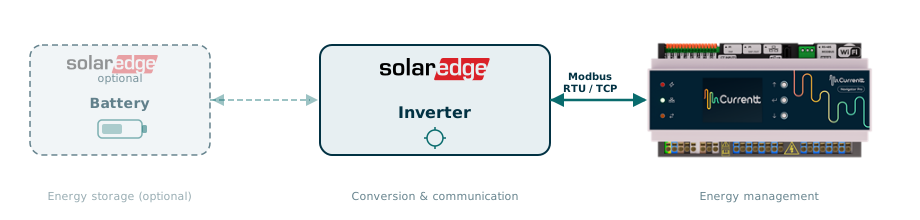
For a StorEdge or Home Hub inverter with a connected battery, all battery data (SoC, charge/discharge power, status) is automatically read via the same connection. Also see the SolarEdge Battery guide.
🔌 Connection options
Connect the inverter to the Currentt Navigator using one of the methods below.
Option 1: Modbus RTU (RS485)
A separate wired connection via an RS485 cable between the inverter and the Currentt Navigator. This is a direct physical connection and does not require any network infrastructure. The cable is connected to the RS485-2 port on the inverter and the RS-485 Modbus connector on the Currentt Navigator.
| Property | Value |
|---|---|
| Speed | Real-time (polling every 1-5 seconds) |
| Connection | RS485 cable (CAT5/CAT6 UTP) |
| Internet required | No |
| Suitable for control | Yes |
Option 2: Modbus TCP (local network)
A connection via the local Ethernet network. The inverter and the Currentt Navigator must both be connected to the same network (or be routable). No separate cable between the devices is needed, only a working network connection (preferably wired, but WiFi is also possible).
| Property | Value |
|---|---|
| Speed | Real-time (polling every 1-5 seconds) |
| Connection | Ethernet (LAN) |
| Internet required | No |
| Suitable for control | Yes |
Limitation: Maximum 1 simultaneous TCP connection per inverter.
Option 3: SolarEdge monitoring API (cloud)
Connection via the SolarEdge cloud. Data is sent by the inverter to the SolarEdge monitoring servers and read via an API. No local connection is needed.
| Property | Value |
|---|---|
| Speed | 10-15 minute delay |
| Connection | Internet (cloud) |
| Internet required | Yes (both sides) |
| Suitable for control | No - read-only |
Limitations:
-
No real-time data (10-15 min delay)
-
Maximum 300 API requests per day
-
Read-only, no control possible - it is not possible to control the inverter, limit power, or change settings via the API. Battery control is also not possible via the API
⚖️ Comparison
| Modbus RTU | Modbus TCP | Cloud API | |
|---|---|---|---|
| Data latency | < 1 sec | < 1 sec | 10-15 min |
| Polling interval | 1-5 sec | 1-5 sec | ~15 min (max 300/day) |
| Internet required | No | No | Yes |
| Physical cable | Yes (RS485) | Yes (Ethernet) | No |
| Max distance | ~1000m (RS485) | Unlimited (LAN) | Unlimited |
| Historical data | No | No | Yes |
| Suitable for control | Yes | Yes | No |
| Setup complexity | Medium | Medium | Low |
✅ Compatible models
Single-phase inverters
| Model | Modbus RTU | Modbus TCP | Cloud API |
|---|---|---|---|
| SE2200H - SE6000H (HD-Wave) | Yes | Yes | Yes |
| SE3000H - SE10000H (Home Wave) | Yes | Yes | Yes |
| SE3500 - SE6000 (older models) | Yes | Yes | Yes |
Three-phase inverters
| Model | Modbus RTU | Modbus TCP | Cloud API |
|---|---|---|---|
| SE3K - SE33.3K | Yes | Yes | Yes |
| SE5K - SE16K (Home Hub) | Yes | Yes | Yes |
Hybrid / StorEdge inverters
| Model | Modbus RTU | Modbus TCP | Cloud API |
|---|---|---|---|
| StorEdge Single-phase | Yes | Yes | Yes |
| StorEdge Three-phase | Yes | Yes | Yes |
| SE5K-SE10K Home Hub | Yes | Yes | Yes |
Firmware requirement: Modbus RTU and TCP require firmware version 3.xxxx or higher. The Cloud API requires that the inverter is commissioned and connected to the SolarEdge monitoring platform.